Sensible Blogging: Where to start?

Sensible Blogging

At the beginning of the month, I was planning on offering a web design tip or tutorial every Tuesday.  I hadn’t started yet because I wasn’t quite sure where I should start, but after thinking it over, I’m simply going to start with a series on blogging in general.  Where to start?  What’s the difference between Blogger and WordPress? Do I need a domain? How do I buy a domain? And answering other similar questions like these.

This week I’m going to answer the question “Where do I start?”

How do you start a blog?  Well, first off, you need an idea or a main topic that you’ll be blogging about. In order to narrow this down some questions you might ask yourself would be:

What would I like to blog about? (For example, family and parenting, homemaking, frugal living, or scrapbooking.)

What are my passions and interests?

Do I have a hobby that I could share with the world?

Is there a gap in some area that I could fill in with my knowledge and expertise?

What would my niche be?

Once you know what you want to blog about you’ll need to ask yourself a few more very important questions:

Have I researched this area well?

What is my motivation for blogging?

Do I have time for a blog, and how will I fit posting into my daily life?

Have I discussed this idea with others for their input, and what do they think?

After you’ve researched your idea and you know what you want to blog about, it’s time to decide on a name for your blog. This can be tough because there are so many blogs already out there that there’s a good chance someone else has already thought of the name you’d like for your blog. I ran into this problem back when I started blogging two years ago. I was starting a frugal blog on coupons, deals, and saving money, and well….let’s just say there’s no lack of these types of fabulous blogs out there.  Finding a great name that someone else hadn’t already chosen was a bit challenging, but I finally came up with “A Lot of Savings” and stuck with it.

I started my first blog on Blogger, so, before I had purchased my own domain (we’ll discuss how to do this in the coming weeks), I used blogger’s free domain of www.alotofsavings.blogspot.com. Please notice that my domain name (www.alotofsavings.blogspot.com) was the same as the title of my blog, A Lot of Savings.

May I please suggest that you always try to keep the title of your blog the same as the domain name of your blog? For example, don’t title your blog “Happy Mom” and have your domain name be www.threekidsandme.com. Sure you could do this, but why? It makes it harder for readers to remember your domain name if you do?  If your blog is titled “Happy Mom,” then make your domain name, www.happymom.com or if you haven’t yet purchase your own domain, www.happymom.blogspot.com or www.happymom.wordpress.com. Having the title of your blog and your domain name the same from the beginning makes a lot of sense and helps readers to find your blog and refer it to others easily. And that’s what we want, right? :-)

Next week, I’ll discuss the differences between blogger, wordpress.com, and wordpress.org, to help you decide which platform is the best fit for you.


Make It Happen Monday!

make it happen monday

I made up our February family calendar last night.

You can scrape me off the floor on February 23rd.

Seriously.

We or should I say mainly *I* will be extremely busy in February. I’ll be finishing up a web design program that I’ve been doing since the end of December, and going to school at night at the local community college (two nights a week). Doing the web design program has been easy so far because it’s been mainly review of things I learned last semester at the community college, but starting on February 1st, it’s going to get a lot harder because for the month of February, I’ll be learning JavaScript and Flash, two things I don’t have much experience using.

The web design program ends February 22, and I’ll feel a whole lot better after that.  My head may be ready to explode, but I’ll be happy to have the program completed and be able to concentrate on other classes I’m taking at the community college. I’ll be glad to finally know how to use Flash and JavaScript, too.

This week our schedule is full but manageable.

Here’s my to-do list for the week:

:: make out grocery list for Whole Foods to shop on Tuesday (I saved $10 there last week using coupons!)

:: work on blog design project that I never got to last week (must finish!)

:: workout at the fitness center two days this week

:: go to library with kids and check out new books plus pick up book on hold

:: look for a recipe and make cookies with Isaac

:: cook with David

That’s it! Happy Monday!

For more Make It Happen Monday or to link-up your own to-do list, please visit Domestically Obsessed!

Week 2 Weight Loss Update

Weight Loss JourneyWell this week’s loss wasn’t as great as last week’s, but still something which is what I’m going for.  My weigh-in day is Sunday morning, and I was 222.5 lbs. so I lost one pound.  Altogether, I’ve lost 6 pounds in two weeks.  That’s a pretty good start.  But I didn’t exercise at all last week! I just haven’t been motivated to get back to the workout video.  Ruben helped me out this morning, though.  He woke up early with me, and we both worked out to the dvd. What a nice guy…

I was planning on working out at school over the weekend, but when we got there on Saturday (water in hand and ready for a workout), it was closed!  I had forgotten that the fitness center closes early on Saturdays.  For sure, though, I’m going to make it there two days this week.  I have to get started so that I don’t fall behind in my visits.  I need to log 30 visits per fitness class that I’m enrolled in to get an “A” for each class.

I’m looking forward to using the time I spend in the fitness center to read the assigned chapters I’ll have each week for my online PHP class (PHP is a programming language). Fun! No really, I want to learn PHP, and I’m thankful to be able to use my workouts as bonus time to be able to read, too.  I’m going to alternate reading my PHP book one day (I should gain muscle simply carrying that book back and forth!  It’s rather thick.) and a book from my Bookin’ It list on the other day.  I plan on working out in the fitness center two days a week for around 1 hour and 40 minutes each time I’m there.

I’ll read while I use the bike or the leg weight machines. I’m not skilled enough be to able to read with using the elliptical machine!

Anyway, I’m hoping with the added exercise that I’ll be able to boost my weight loss to two pounds next week.  We’ll see!

Oh, and I will post a picture next week, too! :-)

Thankful

home school

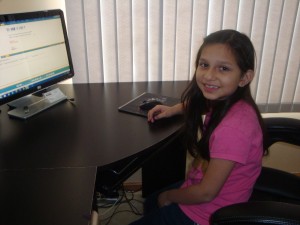
I’m thankful to the Lord to be able to home school our children while at the same time going to school myself. Breanna is happily working on her homework in the picture.  We use a curriculum called Switched-On Schoolhouse which is a computer-based home schooling program.

The program does all the lesson planning which includes scheduling all their lessons, tests, and quizzes. The lessons themselves are excellent.  The kids are learning all the necessary requirements as well as many other interesting things. Their spelling and reading skills have greatly improved as well. I can’t say enough about this program.

But just because the program does all the planning for us doesn’t mean the kids never need help.  While they are able to do most of the work on their own, they still ask for help on a regular basis. Ruben and I can then walk them through or help them with the question they’re struggling with.

Nathan has really been thriving with this program. He’s a visual learner, and because everything is right before his eyes, he is doing well learning with Switched-On Schoolhouse.  Breanna enjoys the program as well, but she recently asked if we could go back to the “old” way we used to home school where I was the teacher. I let her know that I’d think about it and maybe we could change things a bit with her once I begin home schooling Isaac next year (That’s going to be an adventure! :-) ).

For now, we’re staying with this program, and I’m grateful for it.

Super Savings Saturday: Walgreens & Target

I stopped by Target this week and picked up some nice clearance items.  The blue bowl, gerber sippy cups, and nursing cover were all 75% off.

Target Trip

Here’s the rundown of what I paid for each item:

larger Gerber sippy cups $1.44

smaller Gerber sippy cups $1.34

Saucer plate (very nice and sturdy) $1.18

Nursing Cover $4.14 (I really debated whether I should get this or not because I’m not currently pregnant, but we don’t know whether or not the Lord will bless us with another child and if He does….there’s a slim chance of finding a nursing cover so cheap.  I paid around $8.00 for the one I used with David, and it wasn’t as nice as this one and definitely lower quality. I’m just going to hang on to it for now, but I may give it away, too.)

Kashi Go Lean Crisp cereal (I just remembered that I actually got this at Jewel) $0.29 after $3.00 Vocalpoint coupon that I got in the mail

All totaled, I paid $7.99 plus tax for everything pictured.  I saved around $0.40 for using my Target card to pay for my purchase there since they take off an extra 5% whenever you use it.  I do pay that card off at the end of each month and only use it for the discount.

Someone was thrilled with their new sippy cups…

sippy cups

We also made more than one trip to Walgreens this week.  We’ve decided to switch to fluoride-free toothpaste after learning about how bad fluoride actually is for our bodies, so, I was excited to see that the Tom’s of Maine was only $0.99 after Register Reward this week!  I ended up having to go to a few different Walgreens that weren’t by us because someone really hits our local store when there are good Register Reward deals.  The shelves are often cleared. :-( My favorite cashier told me that one day a woman came in and bought 93 body washes that were on Register Reward that week.  No wonder there were none left when I got there.

Anyway, here’s what we did get:

Walgreens Trip

Breathe Right strips were free with free product coupons that had printed out a few weeks ago.

Sandwich bags $0.99 w/in-ad coupon

Gillette Razor $0.99 after $4.00 manufacturer’s coupons and $5.00 Register Reward

Poise pads were $3.89, but I got them for free with a $4.00 manufacturer’s coupon good only at Walgreens that printed a while back

Tom’s of Maine Deodorant $0.99 after $3.00 Register Reward

Centrum Multivitamins $0.99 after $1.00 manufacturer’s coupon (these were on clearance for $1.99)

Family Calendar $2.50 (this was supposed to be $1.00, but it rang up wrong and I didn’t check until after I had left the store)

All totaled, I paid $6.64 out of pocket for everything pictured because I used a few Register Rewards that I already had.  I got back $11.00 in Register Rewards to use on future purchases.

While we were out another day, we stopped at a few different Walgreens stores that were on the way to where we were going.  We picked up fluoride-free toothpaste, more aluminum-free deodorant, (We made the switch to aluminum-free deodorant months ago.  Aluminum in your deodorant isn’t good for you.) mouthwash, and the free after Register Reward ThermaCare heat patches.  I only got one of the children’s toothpaste because after I bought it, I realized that it has fluoride.

Walgreens trip

All the Tom’s of Maine were $0.99 after Register Reward and the ThermaCare was Free after Register Reward.

I’m happy with all the deals we got this week. Did you find any awesome deals?

Related Posts Plugin for WordPress, Blogger...